PhotoQuill vs Paint.NET (2026): Browser Editor vs Classic Desktop App
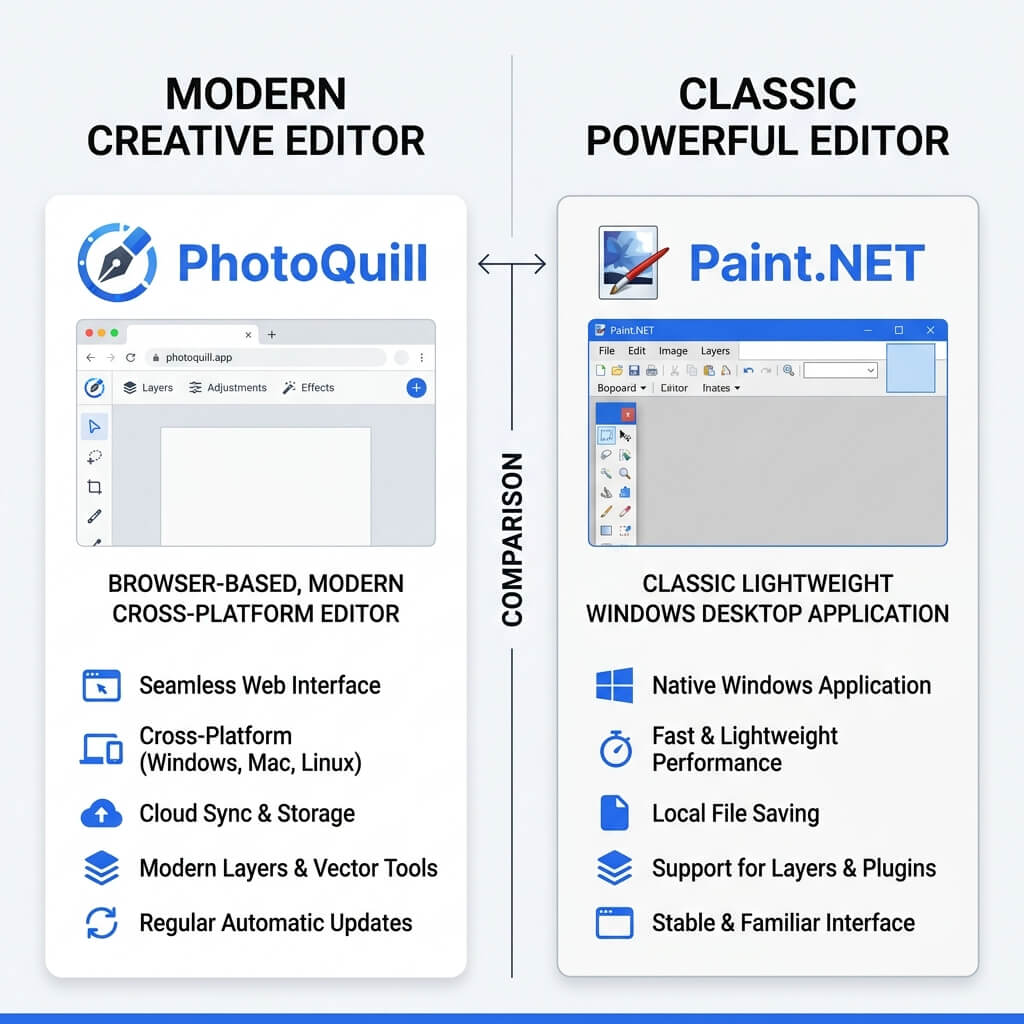
The Verdict (50 Words)
Paint.NET is an outstanding, ultra-lightweight Windows desktop tool perfect for basic image manipulation and users upgrading from MS Paint. However, if you need cross-platform access (Mac/Linux), native PSD support, non-destructive adjustment layers, or AI tools without installing anything, PhotoQuill is the more capable modern solution.
Desktop Legacy vs Browser Modernity
Paint.NET started in 2004 as a college undergraduate project mentored by Microsoft, intended as a free replacement for Microsoft Paint. Decades later, it remains one of the most beloved Windows utilities—a testament to its speed, simplicity, and active community.
PhotoQuill represents a different era of software development. Rather than being tied to the Windows OS via the .NET framework, it utilizes WebAssembly to deliver a Photoshop-caliber experience entirely inside a web browser. The choice between them often comes down to your operating system, whether you have permission to install software, and how deeply you need to edit layers.
Objective Pros & Cons
Paint.NET: The Windows Lightweight Champion
Paint.NET is famous for doing exactly what you need it to do, very quickly, on Windows PCs.
Genuine Strengths:
- Extremely Lightweight: The installer is tiny (~10MB), it uses minimal RAM, and it opens almost instantly even on decade-old computers.
- Windows OS Integration: Excellent integration with Windows, including right-click context menus, thumbnail rendering in Explorer, and native OS dialogs.
- Massive Free Plugin Ecosystem: Over 15 years, the community has built hundreds of free plugins (available on forums) that add everything from RAW support to specialized distortion effects.
- Zero Internet Dependency: Once installed, it never needs to "phone home," making it ideal for highly secure or offline environments.
- Gentle Learning Curve: Familiar to anyone who has ever used MS Paint, making it highly accessible for casual office workers and students.
Real Drawbacks:
- Windows Only: Absolutely no support for Mac, Linux, or ChromeOS.
- No Native PSD Support: Requires hunting down and installing a third-party plugin just to open Photoshop files, and even then, complex layers break.
- Destructive Editing: Lacks modern non-destructive workflows. No adjustment layers (like live Curves or Levels layers) and no native Layer Masks.
PhotoQuill: The Cross-Platform Professional Toolkit
PhotoQuill aims to provide professional-tier tools instantly, without the friction of installation.
Genuine Strengths:
- Hardware Agnostic: Works identically on a Windows gaming PC, a MacBook, a Linux distro, or a school Chromebook.
- No Installation Rights Needed: Perfect for corporate environments or library computers where you lack administrator rights to install .exe files like Paint.NET.
- Professional Layer Architecture: Full support for Layer Masks, Clipping Masks, Adjustment Layers, and Layer Styles—essential tools for modern non-destructive editing.
- High-Fidelity PSD Engine: Opens complex Photoshop files cleanly, making it a viable tool for collaborating with professional designers.
- Built-In AI: Includes modern conveniences like AI background removal and smart object selection out of the box, without needing plugins.
Real Limitations:
- Slightly Steeper Learning Curve: The Photoshop-style interface has more panels and tools than Paint.NET, which can intimidate absolute beginners.
- Browser Memory Limits: Editing massive (e.g., 8K) multi-layered files can occasionally hit browser memory ceilings that a native desktop app might bypass.
Technology Deep Dive: Plugins vs Built-in Features
A major draw for Paint.NET is its plugin community. If you need a specific feature—like Drop Shadow, PSD support, or specialized noise generation—you go to the Paint.NET forums, download a `.dll` file, and move it into your installation folder. This keeps the core app incredibly light, but places the burden of feature-gathering on the user.
PhotoQuill takes the "batteries included" approach. Drop Shadows (via Layer Styles), PSD support, and advanced filters are built directly into the web application. You don't have to manage plugins or worry about version compatibility. Because it updates seamlessly in the browser, every user always has access to the complete, current feature set.
Feature Comparison Table
| Feature | PhotoQuill | Paint.NET |
|---|---|---|
| Cost | Free | Free (Direct download) |
| Supported OS | Windows, Mac, Linux, ChromeOS | Windows Only |
| Installation Required | No (Browser) | Yes |
| Non-Destructive Layers | Yes (Adjustment Layers, Masks) | No (Basic layers only) |
| Native PSD Support | Yes (High Fidelity) | No (Requires Plugin) |
| AI Object Removal | Yes (Built-in) | No |
| Plugin Ecosystem | No | Yes (Huge community) |
Who Should Use Which?
✅ Choose PhotoQuill if you...
- Use a Mac, Chromebook, or Linux machine
- Need to edit at work/school where you can't install software
- Need to open and edit PSD files from colleagues
- Want to use Layer Masks and non-destructive adjustments
- Want modern AI tools for quick background removal
✅ Choose Paint.NET if you...
- Are on a Windows PC and want a permanent desktop app
- Have an older, low-spec Windows machine
- Want a simple, MS Paint-style interface for quick edits
- Need to work completely offline for security reasons
- Enjoy hunting for and installing community plugins
How to Edit Photos in a Browser Instead of Installing Paint.NET
Skip the download
If you are on a Mac, a restricted work computer, or simply don't want to manage a software installation, you can skip downloading the Paint.NET installer entirely.
Launch PhotoQuill
Open Chrome, Edge, Firefox, or Safari and go to photoquill.com. The full editor loads directly in your browser tab in under two seconds.
Edit and Save locally
Drag your image in, make your edits using professional layers and adjustments, and click File > Export. Your finished image saves straight to your local Downloads folder—your files never touch our servers.