Best RAW Photo Editing Software in 2026 (Free & Paid)
Shooting in camera RAW captures the raw data recorded by your camera sensor. Unlike compressed JPG images, a RAW file gives you several stops of recoverable highlight and shadow latitude, pristine color science, and non-destructive white balance control. Choosing the right RAW photo editing software determines how cleanly those 14-bit color tones render on screen. Here is a definitive comparison of top free, open-source, and professional RAW editors in 2026.
Why RAW Format Demands Dedicated Photo Editing Software
Standard image viewers treat photos as finished bitmaps, reading 8-bit color channels where exposure and color balance are permanently baked into pixels. When you capture a RAW shot, your camera bypasses all in-camera sharpening, noise suppression, and tone curves. Instead, it writes a proprietary mosaic file—such as Canon .CR2/.CR3, Nikon .NEF, or Sony .ARW—containing raw photosite values.
To turn that sensor data into a visible photograph, your photo editing software must perform demosaicing: calculating true RGB values from a Bayer color filter array. Advanced editors let you pull detail out of blown clouds or pitch-black shadows that would produce harsh color banding in a standard JPG. If you already have files ready to inspect, check our walkthrough on opening RAW files online for free without software installation.
To help you navigate available software, the following comparison highlights leading RAW engines across budget, licensing, and workflow categories:
| Software | Pricing Model | RAW Engine / Demosaic | Sidecar / Catalog | Best Applied To |
|---|---|---|---|---|
| PhotoQuill | Free (No Account) | Client WebAssembly / WebGPU | Direct Browser Canvas | Instant RAW inspection and quick browser edits |
| Adobe Lightroom Classic | $9.99 – $19.99 / mo | Adobe Camera Raw (ACR) | SQLite Catalog + XMP | High-volume event and studio batch processing |
| Capture One Pro | $24 / mo or $299 perpetual | Custom Camera Profiles | Sessions & Catalogs | Studio tethering and elite commercial color grading |
| DxO PhotoLab 7 | $229 (one-time) | DeepPRIME XD2 AI | File System / Sidecar | Extreme high-ISO denoising and lens correction |
| Darktable | Free & Open Source | Scene-Referred 32-bit Float | XMP Sidecars | Technical photographers wanting full pipeline control |
| RawTherapee | Free & Open Source | AMaZE / RCD Demosaicing | PP3 Sidecars | Maximum detail extraction from complex textures |
The Top Free & Open-Source RAW Processors
You do not need an ongoing Adobe Creative Cloud subscription to develop RAW files. The open-source community maintains two sophisticated desktop RAW engines, alongside lightweight browser solutions:
Darktable & RawTherapee
Darktable uses a modular, scene-referred workflow based on modern color science (Filmic RGB and Tone Equalizer modules). It mirrors Lightroom's light table interface while handling extensive collections. RawTherapee focuses heavily on optical demosaicing algorithms like AMaZE (Anisotropic Morphological Zero-Crossing Estimation), squeezing maximum resolution from fine architectural patterns and landscape foliage.
Both applications run on Windows, macOS, and Linux. However, their learning curve is steep: beginners often find the dozens of technical slider tabs overwhelming compared to simplified consumer editors.
PhotoQuill Browser RAW Studio
When you receive camera RAW files on a work computer, a friend's laptop, or a Chromebook, installing 500MB software packages is rarely practical. PhotoQuill executes LibRaw routines compiled directly into WebAssembly.
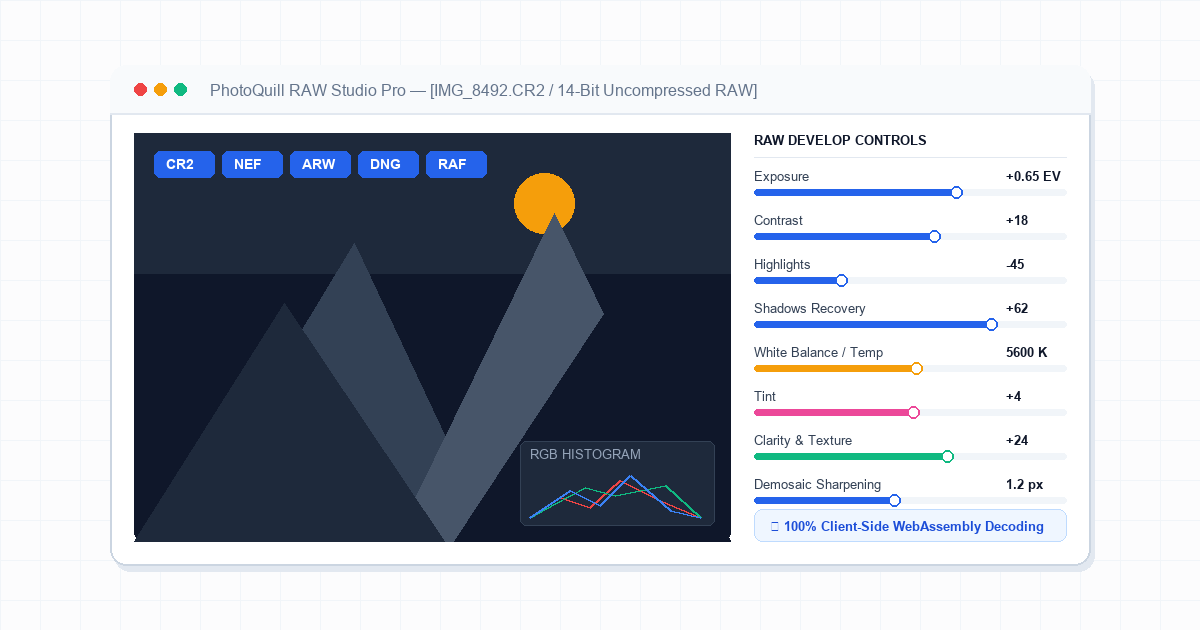
Your browser decodes 14-bit RAW sensor data locally on your device hardware using WebGPU shaders. You can adjust exposure, balance color temperatures, and export clean high-resolution JPG or PNG assets in seconds—without sending your confidential images across cloud servers.
Professional Commercial Powerhouses Compared
For professional commercial photographers delivering thousands of images on tight deadlines, dedicated commercial platforms offer distinct competitive advantages:
- Adobe Lightroom: Remains the industry baseline for batch processing. Its smart masking tools and mobile synchronization make culling and color grading large wedding shoots fast.
- Capture One Pro: Widely regarded as the benchmark for studio tethering. Capture One reads camera color science with custom profiles tailored to medium format and mirrorless camera models. For a closer look at how pixel editors compare against tethered suites, see our Capture One workflow comparison.
- DxO PhotoLab: Unmatched optical corrections and AI noise reduction (DeepPRIME). If you shoot wildlife or sports in low light at ISO 12,800, DxO reconstructs clean edges that other RAW engines smudge into noise.
Once you develop your initial exposure and tonal balance, export your photo to complete local pixel retouching, object removal, or sharpening high-resolution camera images before client delivery.
Step-by-Step: How to Open and Edit RAW Photos in PhotoQuill
You can develop camera RAW files right inside your web browser without creating accounts or paying monthly fees. Follow these steps:
Load Your Camera RAW File
Drag and drop your .CR2, .NEF, .ARW, or .DNG file directly onto the PhotoQuill canvas, or click File > Open in the top menu bar. The WebAssembly engine decodes the raw photosite data in seconds.
Adjust Tonal Values and Exposure
Navigate to Image > Adjustments > Brightness/Contrast or open Levels (Ctrl+L). Recover shadow details and adjust midtone exposure using the histogram sliders.
Fine-Tune Color Temperature and Curves
Select Curves (Ctrl+M) to apply gentle S-curves for contrast. Use Hue/Saturation (Ctrl+U) to balance sky vibrance and skin warmness without clipping color channels.
Export as Full-Resolution Web Asset
When satisfied with your color grade, click File > Export As. Choose PNG for lossless graphic preservation or JPG set to 95% quality for web publishing.