PhotoQuill vs Pixelmator Pro (2026): Mac Native vs Cross-Platform
The Verdict (50 Words)
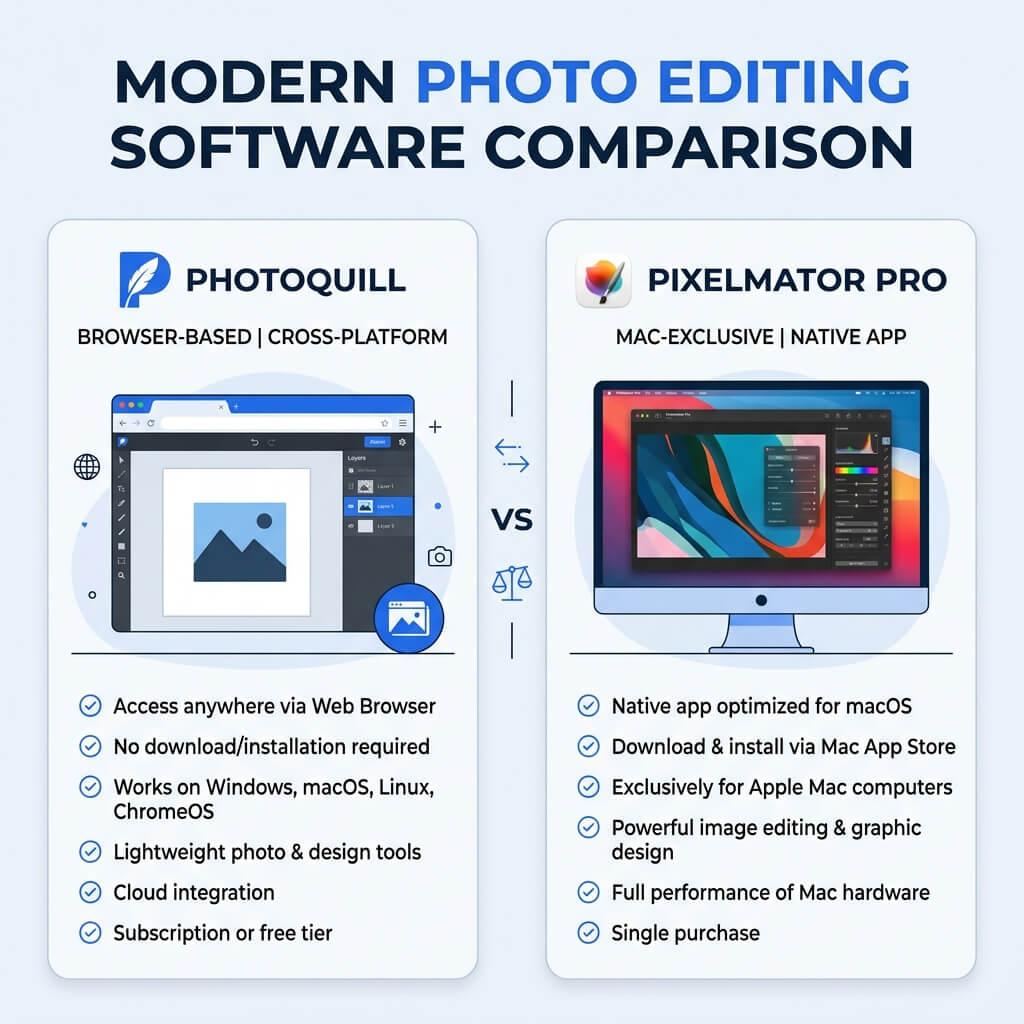
If you are exclusively in the Apple ecosystem and want a beautifully integrated, one-time purchase native app, Pixelmator Pro is exceptional. However, if you use Windows, share PSDs with non-Mac users, or want professional photo editing tools completely for free with zero installation, PhotoQuill is the smarter, cross-platform choice.
The Apple Ecosystem vs The Open Web
The choice between PhotoQuill and Pixelmator Pro comes down to a fundamental platform decision: do you want software tightly coupled to a specific operating system, or software that lives in the open web?
Pixelmator Pro is famous for being the ultimate "Mac-assed Mac app." Built entirely on Apple's native APIs (Metal for graphics, Core ML for AI), it was acquired by Apple in 2024, signaling an even deeper integration into the macOS ecosystem. PhotoQuill, conversely, is built on web standards (WebAssembly and WebGL). It doesn't care if you are using a $3,000 MacBook Pro, a Windows gaming rig, or a $200 school Chromebook—it delivers the same professional tools everywhere.
Objective Pros & Cons
Pixelmator Pro: The Ultimate Mac Native Editor
Pixelmator Pro is available exclusively on the Mac App Store for a one-time fee (typically $49.99).
Genuine Strengths:
- Apple Silicon Native Optimization: Built ground-up for M-series chips using the Metal API, making it incredibly fast and efficient on modern Macs.
- macOS Deep Integration: Seamlessly hooks into iCloud Drive, Photos.app, Quick Look, and Apple Shortcuts for automated workflows.
- ML Super Resolution: Built-in machine learning tools that upscale low-resolution images with remarkable clarity using Apple's Neural Engine.
- Non-Destructive Color Adjustments: Color grading tools are excellent, non-destructive, and very intuitive.
- Apple Acquisition Backing: Being owned by Apple ensures long-term stability and continued optimization for future macOS releases.
- RAW Editing Support: Excellent handling of RAW files leveraging Apple's system-level RAW engine.
Real Drawbacks:
- Mac Exclusive: Zero support for Windows, Linux, or ChromeOS. If you switch platforms, you lose access to your tool and native files.
- Paid Software: Requires an upfront purchase of $49.99.
- Quirky PSD Export: While it opens PSDs, complex layer setups, text styling, and certain adjustment layers often don't translate perfectly back to Photoshop users.
PhotoQuill: The Free Cross-Platform Powerhouse
PhotoQuill runs entirely in your web browser, democratizing professional editing tools.
Genuine Strengths:
- Cross-Platform Universal Access: Works flawlessly on Windows, Mac, Linux, and ChromeOS. Your workflow is never tied to a hardware purchase.
- 100% Free: No upfront cost, no subscriptions, no premium paywalls. (Saves you $49.99).
- No Installation Required: Opens instantly via URL, perfect for borrowing a computer, using a school device, or working under strict corporate IT policies.
- Superior PSD Fidelity: Because PhotoQuill's architecture closely mimics Adobe's, PSD files exchanged with Photoshop users maintain much higher fidelity than those exported from Pixelmator.
- Local AI Processing: Features like AI background removal run locally in your browser via WASM, providing fast results without cloud uploads.
Real Limitations:
- No Deep OS Integration: Cannot integrate with Finder tags, iCloud Photos library natively, or Apple Shortcuts.
- Requires Initial Internet Connection: While processing is local, you must be online to load the application initially.
Technology Deep Dive: Metal API vs WebAssembly
Pixelmator Pro achieves its speed by using Apple's Metal API. Metal allows developers to write code that speaks almost directly to the GPU on Mac computers. This is why brushing, zooming, and applying effects feel impossibly smooth on a Mac, but it is also the exact reason Pixelmator can never be ported to Windows.
PhotoQuill uses WebAssembly (WASM) and WebGL. WASM allows high-performance C++ code to run securely inside a web browser, while WebGL handles GPU acceleration. While Metal might have a slight edge in raw hardware utilization on a Mac, WebAssembly provides near-native performance that is universally compatible. PhotoQuill's engine ensures that complex edits, like calculating Gaussian blurs or executing AI masking models, run surprisingly fast on almost any modern hardware, regardless of the operating system.
Feature Comparison Table
| Feature | PhotoQuill | Pixelmator Pro |
|---|---|---|
| Cost | Free | $49.99 (One-time) |
| Supported Platforms | Windows, Mac, Linux, ChromeOS | macOS Only |
| Installation Required | No (Browser) | Yes (Mac App Store) |
| Apple Silicon Optimization | Very Good (WASM) | Exceptional (Metal API) |
| PSD Import/Export Fidelity | High | Moderate |
| ML Image Upscaling | No | Yes (Core ML) |
| AI Background Removal | Yes (Local WASM) | Yes (Core ML) |
| macOS Shortcuts Integration | No | Yes |
Who Should Use Which?
✅ Choose PhotoQuill if you...
- Use a Windows PC, Linux machine, or Chromebook
- Frequently share PSD files with Photoshop users
- Want professional editing tools without spending money
- Work across multiple devices with different operating systems
- Cannot install software on your work or school computer
✅ Choose Pixelmator Pro if you...
- Are entirely committed to the Apple ecosystem (Mac/iPad)
- Want a native app utilizing the Metal API for maximum performance
- Need to automate workflows using Apple Shortcuts
- Rely heavily on AI image upscaling (Super Resolution)
- Prefer a one-time purchase over subscriptions, but don't mind paying
How to Edit Photos on Windows Without Pixelmator Pro
Skip looking for a Windows port
Pixelmator Pro is Mac-only and will likely remain so following its acquisition by Apple. Instead of searching for unofficial ports, simply open your web browser (Chrome, Edge, or Firefox).
Open PhotoQuill
Navigate to photoquill.com. The editor loads instantly without any software installation, account creation, or license fees.
Use familiar professional tools
Drag your image onto the canvas. You have full access to non-destructive adjustment layers, layer masks, healing tools, and AI retouching features comparable to those found in premium desktop apps.