PhotoQuill vs Corel PaintShop Pro (2026): Browser Editor vs Classic Desktop
The Verdict (50 Words)
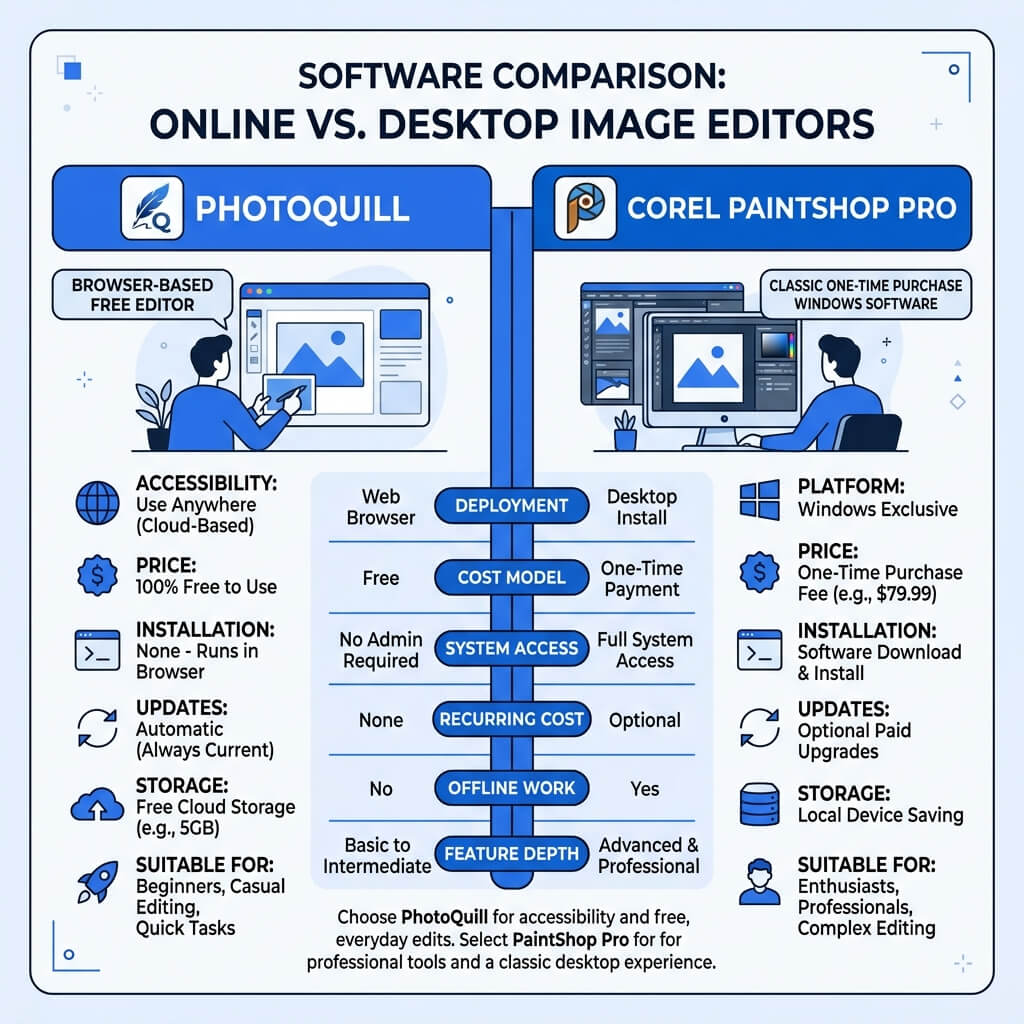
Corel PaintShop Pro is a fantastic, feature-dense Windows application for users who want to buy software once and own it forever. However, if you want similar professional layer editing, modern AI background removal, and the ability to work across Windows, Mac, and Chromebooks for free, PhotoQuill is the smarter choice.
Legacy vs Accessibility
Corel PaintShop Pro has a long and respected history. It originated as a simple shareware program in the 1990s and has evolved into a massive, AI-equipped suite that directly rivals Adobe Photoshop for Windows users who despise subscriptions. It is a heavyweight champion of traditional software.
PhotoQuill represents a paradigm shift. Rather than demanding a license key, a 1GB+ installation, and a specific operating system, PhotoQuill exists in the cloud, utilizing local browser resources to edit photos instantly. The debate centers on whether you need the specialized depth of a massive desktop suite or the agile, cost-free accessibility of a modern web app.
Objective Pros & Cons
Corel PaintShop Pro: The Windows Heavyweight
PaintShop Pro is a perpetual-license suite packed with decades of accumulated features.
Genuine Strengths:
- One-Time Purchase: A perpetual license (~$79.99 for the standard version) means you own the software forever without monthly Adobe fees.
- Extensive AI Tools: Includes AI Background Replacement, AI Sky Replacement, AI Denoise, and AI Artifact Removal built right into the app.
- RAW Processing: Includes the AfterShot lab for comprehensive non-destructive RAW photo development supporting over 400 camera profiles.
- Advanced Scripting: You can record actions and create complex macros to automate repetitive batch editing tasks.
- Print Ready: Natively supports CMYK color spaces, which is critical if you are designing files intended for commercial printing.
- Niche Features: Supports 360-degree photo editing and dedicated HDR merging tools.
Real Drawbacks:
- Windows Only: Absolutely no support for macOS or Linux.
- Bloated UI: The interface can feel cluttered and overwhelming due to the sheer number of features added over the last 20 years.
- Upfront Cost: Requires an initial investment, and major upgrades (like moving from version 2024 to 2026) usually require a paid upgrade license.
PhotoQuill: The Agile Web Alternative
PhotoQuill strips away the bloat, delivering core professional tools instantly in the browser.
Genuine Strengths:
- Cross-Platform Universal Access: Works flawlessly on Mac, Windows, Linux, and ChromeOS. You aren't locked into the Windows ecosystem.
- 100% Free: No upfront cost, no upgrade fees, no license keys.
- Zero Installation: Start editing immediately on any computer with a web browser. Perfect for multi-device workflows.
- Cleaner Interface: A streamlined UI that closely mirrors Photoshop, making it easier to learn without decades of legacy menus.
- Local AI Processing: Features like AI Background Removal execute locally via WASM, providing fast results without requiring a desktop GPU.
Real Limitations:
- No CMYK Support: Operates strictly in the RGB/sRGB space, so it's not suited for prepress print production.
- No Advanced Scripting: Lacks the ability to record complex macros for automated batch processing.
Technology Deep Dive: Native Windows vs Browser Sandbox
PaintShop Pro is deeply embedded in the Windows operating system. It utilizes the Windows registry, requires a lengthy installation, and leverages DirectX for hardware acceleration. This tight integration allows it to perform complex tasks (like batch processing hundreds of RAW files) efficiently, but it completely alienates Mac users.
PhotoQuill lives in the browser sandbox. By using WebAssembly (WASM), PhotoQuill translates high-performance C++ image processing code into a format that Chrome, Safari, or Edge can execute securely at near-native speeds. It sacrifices deep OS integration (like right-click context menus in File Explorer) to achieve total platform independence.
Feature Comparison Table
| Feature | PhotoQuill | Corel PaintShop Pro |
|---|---|---|
| Cost | Free | ~$79.99 (One-time) |
| Platform Support | Windows, Mac, Linux | Windows Only |
| Installation Required | No | Yes (>1GB) |
| AI Background Removal | Yes (Local) | Yes |
| CMYK Print Support | No | Yes |
| RAW Photo Support | Basic Native | Advanced (AfterShot) |
| Macro Scripting | No | Yes |
Who Should Use Which?
✅ Choose PhotoQuill if you...
- Use a Mac or ChromeOS device
- Want professional layer editing completely for free
- Need to edit photos across different operating systems
- Only need RGB color space for web and screen use
- Don't want to manage software licenses or installations
✅ Choose PaintShop Pro if you...
- Are exclusively on Windows and want a permanent desktop app
- Need to process hundreds of RAW files in batches
- Prepare graphics for commercial CMYK printing
- Want to record macros to automate repetitive tasks
- Need specialized tools for 360-degree cameras
How to Do Basic Photo Editing Without Buying PaintShop Pro
Open a Web Browser
Instead of downloading a massive installer and managing license keys, open Chrome, Edge, or Safari and navigate to photoquill.com.
Import Your Image
Drag and drop your JPEG, PNG, or RAW file directly onto the PhotoQuill canvas. The application loads instantly within the browser.
Edit and Export
Use the professional adjustment layers, clone stamp, and AI selection tools on the right sidebar. When finished, go to File > Export to save the edited image locally to your machine.