PhotoQuill vs Luminar Neo (2026): AI Automation vs Precision Control
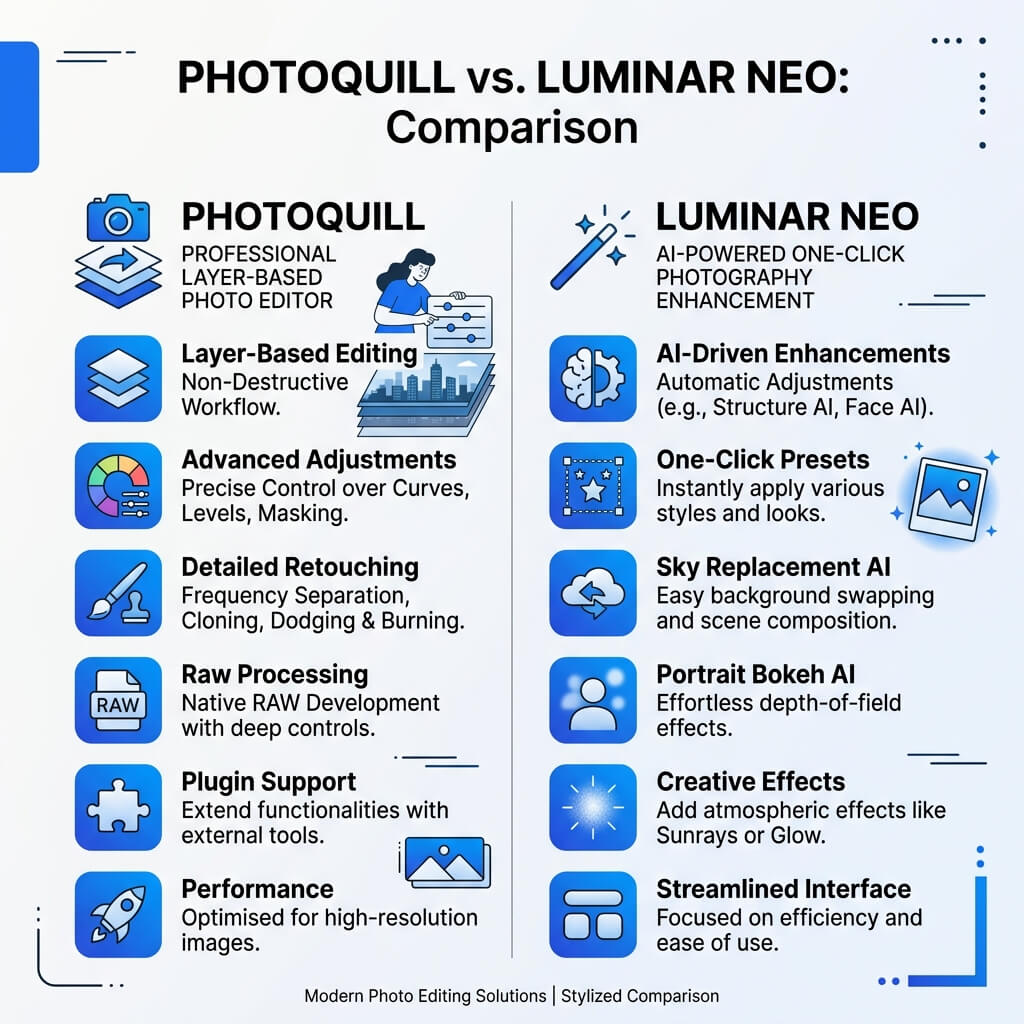
The Verdict (50 Words)
Skylum's Luminar Neo is a brilliant time-saver for volume photographers who want AI to automatically enhance portraits and replace skies. PhotoQuill is a precision layer-based editor for users who want total control over every pixel, PSD compatibility, and professional retouching tools—all completely free.
Two Different Approaches to Editing
The debate between PhotoQuill and Luminar Neo isn't about which software is "better"; it's about whether you want the software to do the work for you, or if you want the tools to do the work yourself.
Luminar Neo represents the pinnacle of "slider-based AI editing." Its interface is designed to hide complexity. You don't create a mask to whiten teeth; you drag a "Teeth Whitening" slider, and the AI finds the teeth and brightens them. This is incredible for wedding or event photographers processing hundreds of shots.
PhotoQuill represents the classic, professional layer-based paradigm. It gives you raw tools—Healing Brushes, Curves, Layer Masks, Clone Stamps. It requires more skill and time per photo, but it never restricts your creative vision to what an AI model was trained to recognize.
Objective Pros & Cons
Luminar Neo: The AI Automation Engine
Luminar Neo operates heavily on AI models to automate traditionally tedious tasks in photography.
Genuine Strengths:
- Sky AI: The best sky replacement tool on the market. It doesn't just swap the sky; it automatically relights the foreground to match the color temperature and direction of the new sky's light.
- Portrait AI: Instant sliders for skin smoothing, blemish removal, eye enhancement, and face slimming without ever painting a mask.
- Relight AI: Builds a 3D depth map of your 2D photo, allowing you to independently adjust the lighting of the foreground versus the background.
- Batch Processing: Apply complex AI adjustments to entire folders of images simultaneously, saving hours of workflow time.
- Plugin Support: Can function as a plugin for Lightroom or Photoshop, fitting into existing professional workflows.
Real Drawbacks:
- Subscription Cost: While heavily marketed as having a "lifetime" license, the reality is that the Pro subscription ($79-$149/year) is required to access the generative AI extensions and major updates.
- Lack of Precision: If the AI misinterprets an edge or over-smooths a texture, you have limited tools to manually correct the AI's mistake at a pixel level.
- No Deep PSD Support: It is not a compositing tool and cannot open or export complex layered PSD files.
- Performance: Heavy reliance on AI models means the software can be resource-intensive and sometimes sluggish on older hardware.
PhotoQuill: The Precision Layer Editor
PhotoQuill focuses on providing a complete, non-destructive layer ecosystem directly in your browser.
Genuine Strengths:
- Total Pixel Control: Features like the Clone Stamp, adjustable Healing Brush, and manual masking give you absolute authority over the final image.
- 100% Free: No subscriptions, no paid extensions, no "generative credits."
- High-Fidelity PSD Support: Perfect for collaborating with designers, seamlessly opening Photoshop files with layers and blend modes intact.
- Zero Installation: Runs instantly in the browser, making it accessible on any device, including Chromebooks and locked-down corporate machines.
- Privacy First: Image processing (including AI background removal) happens locally via WASM. Your photos aren't sent to a server for AI analysis.
Real Limitations:
- Steeper Learning Curve: You need to understand how layers, masks, and adjustment curves work. There is no "Make Beautiful" slider.
- Slower for Volume: Editing 500 wedding photos individually in PhotoQuill is impractical compared to Luminar's batch AI capabilities.
Technology Deep Dive: AI Hallucinations vs Deterministic Editing
A critical consideration when using Luminar Neo's generative tools (like Generative Erase or Sky AI) is the concept of "AI Hallucinations." Because these tools synthesize new pixels based on training data, they can sometimes generate artifacts—a weirdly shaped cloud, a smudged texture where a person used to be, or unnatural skin tones. For artistic photography or social media, this is rarely an issue. But for commercial product photography or photojournalism, introducing fabricated pixels is often unacceptable.
PhotoQuill relies heavily on deterministic editing. When you use the Clone Stamp, you are copying exact pixels from point A to point B. When you adjust a Curve, you are applying a mathematical formula uniformly. The result is exactly what you dictate, ensuring strict accuracy for product shots and professional retouching.
Feature Comparison Table
| Feature | PhotoQuill | Luminar Neo |
|---|---|---|
| Cost | Free | Paid / Subscription |
| Editing Paradigm | Layers & Precision | Sliders & AI Automation |
| Automated Sky Replacement | No (Manual only) | Yes (Industry leading) |
| One-Click Portrait Retouch | No | Yes |
| PSD Compatibility | High Fidelity | None/Poor |
| Installation Required | No (Browser) | Yes (Heavy Desktop App) |
| Local Processing Privacy | 100% Local | Some Cloud AI usage |
| Best Use Case | Single Photo Deep Retouch | Volume Photo Enhancement |
Who Should Use Which?
✅ Choose PhotoQuill if you...
- Edit product photography requiring exact color and edge control
- Want to perform professional frequency separation on portraits
- Need to open, edit, or export layered PSD files
- Prefer not to pay subscription fees for photo software
- Value a traditional Photoshop-style workflow
✅ Choose Luminar Neo if you...
- Process high volumes of photos (weddings, events, real estate)
- Frequently need to replace dull skies in landscape shots
- Want professional-looking portraits without learning masking
- Prefer adjusting sliders over painting with brushes
- Want a plugin to speed up your existing Lightroom workflow
How to Achieve Luminar-Style Sky Effects in PhotoQuill
Extract the original sky
Open your landscape in PhotoQuill. Use the Magic Wand or AI Select Subject tool to select the sky, then click the "Add Raster Mask" button at the bottom of the layers panel to hide it.
Insert the new sky
Drag and drop a new sky image into your document. In the layers panel, drag this new sky layer beneath your original landscape layer.
Color grade to match
To mimic Luminar's AI relighting, add a Curves adjustment layer and clip it to your foreground landscape (Alt+Click between the layers). Adjust the RGB channels to match the color temperature (warm/cool) of your new sky.