The 9 Best Free Photoshop Alternatives in 2026
Photoshop costs at least $19.99 a month, and Adobe has no free version of it on desktop or on the web. The good news is that free alternatives have never been better: Affinity became free in late 2025, GIMP and Krita both shipped major releases, and browser editors now open real PSD files. We compared nine free Photoshop replacements on PSD support, platforms and what each one is best at. Updated November 11, 2026.
A note on fairness: PhotoQuill is our own editor. We included it where it fits and say plainly where another tool is the better choice.
Quick Picks
- Closest to Photoshop on desktop: Affinity
- Best online, no download: PhotoQuill
- Best open source and best for Linux: GIMP
- Best for quick PSD edits in a browser: Photopea
- Best for digital painting: Krita
- Best for quick online touch-ups: Pixlr
- Best simple editor for Windows: Paint.NET
- Best free RAW editor (Lightroom-style): darktable
- Best for social media graphics: Canva
Free Photoshop Alternatives Compared
| Tool | Price | Platforms | PSD files | Best for |
|---|---|---|---|---|
| Affinity | Free (Canva account) | Windows, Mac | Opens and exports | Pro editing without a subscription |
| PhotoQuill | Free; AI uses credits | Browser (Chrome, Edge) | Opens and saves layered PSDs | Photoshop-style editing with no install |
| GIMP | Free, open source | Windows, Mac, Linux | Opens; effects only partly kept | Open-source editing with plugins |
| Photopea | Free with ads | Browser | Opens and saves | Quick edits to PSD files |
| Krita | Free, open source | Windows, Mac, Linux | Opens and saves | Digital painting and illustration |
| Pixlr | Free with ads and a daily save limit | Browser, mobile | Limited | Fast touch-ups for beginners |
| Paint.NET | Free | Windows | With a third-party plugin | Simple, lightweight editing |
| darktable | Free, open source | Windows, Mac, Linux | No | RAW photo development |
| Canva | Free; Pro plan paid | Browser, desktop, mobile | No PSD export | Social posts from templates |
1. Affinity: Closest Free Alternative on Desktop
In late 2025 Canva combined Affinity Photo, Designer and Publisher into one app and made it free. It is the closest thing to Photoshop you can install without paying: layers, masks, adjustment layers, RAW development, CMYK and PSD import and export, plus vector and page layout tools in the same window.
Good: Photoshop-class editing with no subscription, and it opens your existing PSDs. Not so good: needs a Canva account, the AI features cost extra, and there is no Linux version. See PhotoQuill vs Affinity Photo.
2. PhotoQuill: Best Free Photoshop Alternative Online
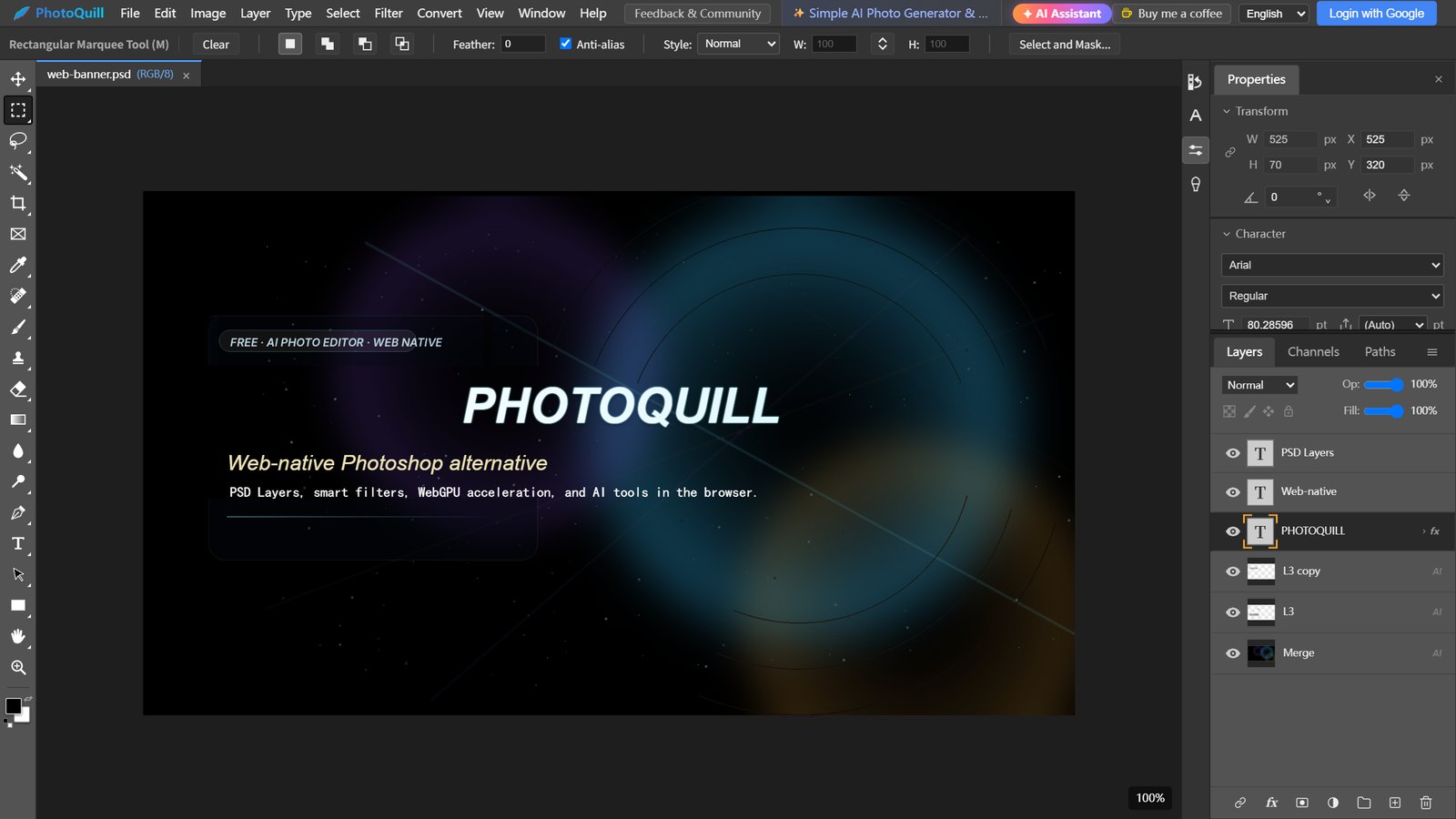
PhotoQuill is a free Photoshop-style editor that runs in your browser, so there is nothing to install. It opens and saves layered PSD files with masks, adjustment layers, blend modes and text, and its menus and shortcuts follow Photoshop: Ctrl+J for Layer via Copy, Ctrl+L for Levels, Free Transform, Content-Aware Fill and the healing tools. Editing runs on your own device with WebGPU and needs no account. Optional AI tools, including an assistant that builds designs as editable layers, need a free Google sign-in and credits.
Good: nothing to install, real PSD round trips, and a layout Photoshop users already know. Not so good: needs a browser with WebGPU (current Chrome or Edge), has no plugins, and AI features use credits (10 on sign-up plus 5 free a day). See everything the online editor includes or PhotoQuill vs Photoshop.
3. GIMP: Best Open-Source Alternative
GIMP has improved more in the last two years than in the decade before. GIMP 3.0 (2025) added non-destructive filters, GIMP 3.2 (March 2026) added vector and link layers, and the current release is 3.2.8. It has the largest library of plugins and scripts of any free editor.
Good: free forever, runs on Linux, and endlessly customizable. Not so good: its interface and shortcuts differ from Photoshop's, and PSD layer styles are not kept. There is no official web version; see GIMP online options and PhotoQuill vs GIMP.
4. Photopea: Best for Quick PSD Edits in a Browser
Photopea copies Photoshop's interface closely and opens PSD, XCF and Sketch files in a browser tab. It is a handy free tool for quick changes to a file someone sent you, and it runs in almost any browser.
Good: very broad file support and nothing to install. Not so good: ads on the free version, and very large files can feel slow. See PhotoQuill vs Photopea and Photopea without ads.
5. Krita: Best for Digital Painting
Krita is built for painting and illustration rather than photo retouching, with one of the best brush engines of any app, free or paid. Krita 5.3 and the early-access Krita 6.0 (March 2026) improved PSD support: text, vector masks and shapes now load and save without being flattened.
Good: superb brushes, and it opens and saves PSDs. Not so good: fewer photo-retouching tools than Photoshop or GIMP, and 6.0 is still early access. See PhotoQuill vs Krita.
6. Pixlr: Best for Quick Online Touch-Ups
Pixlr is a simple browser editor with layers and AI helpers such as background removal. It suits beginners who want a quick fix rather than a full Photoshop workflow.
Good: starts fast and is easy to learn. Not so good: the free plan has ads, a cap on saves per day and a small allowance of AI credits, and it has fewer professional tools. See PhotoQuill vs Pixlr.
7. Paint.NET: Best Simple Editor for Windows
Paint.NET is a lightweight Windows editor with layers, effects and a large library of community plugins. Version 5.1.12 (March 2026) is the current release.
Good: fast, simple and free. Not so good: Windows only, and opening PSDs needs a third-party plugin that supports only part of the format. See PhotoQuill vs Paint.NET.
8. darktable: Best Free RAW Editor
darktable is not a replacement for Photoshop's layers and compositing; it is a free alternative to Lightroom for organizing and developing RAW photos. Version 5.6 (June 2026) added optional AI tools, including AI object masks.
Good: professional RAW processing at no cost. Not so good: a steep learning curve, and no layered compositing.
9. Canva: Best for Social Media Graphics
If you mostly put text on photos and make posts from templates, Canva is quicker than any Photoshop alternative. Many of its AI photo tools, such as the background remover, are part of Canva Pro.
Good: a huge template library and almost no learning curve. Not so good: limited pixel-level control and no PSD export. See PhotoQuill vs Canva.
Best Free Photoshop Alternatives for Linux
Photoshop has never run on Linux. The best free replacements are GIMP for photo editing, Krita for painting and darktable for RAW photos; all three are open source and available from most distributions' package managers. Browser editors work too: Photopea runs in any browser, and PhotoQuill runs where your browser and graphics driver support WebGPU (Chrome on Linux has been turning it on gradually since version 144).
Best Free Photoshop Alternatives for Mac
On a Mac, Affinity is the strongest free choice, and GIMP, Krita and darktable all have native builds. PhotoQuill and Photopea run in Chrome or Edge with nothing to install. For a wider look, see the best free photo editing software for Mac.
Open-Source Photoshop Alternatives
If you want open-source software, the choice is GIMP for photo editing, Krita for painting and darktable for RAW development. Affinity, Photopea, Pixlr, Paint.NET, Canva and PhotoQuill are free to use but are not open source.
Free Photoshop Alternatives Online (No Download)
If you can't install software, on a school or work computer or a Chromebook, use a browser editor. PhotoQuill and Photopea both open layered PSD files. See our free online Photoshop page for what PhotoQuill includes, Photoshop online with no sign-up for editors that don't ask for an account, and Photoshop for Chromebook for ChromeOS tips.
How to Choose
- You want the closest thing to Photoshop and use Windows or Mac: Affinity.
- You don't want to install anything, or you switch between computers: PhotoQuill or Photopea.
- You're on Linux or prefer open source: GIMP, plus Krita for painting.
- You mainly paint or draw: Krita.
- You shoot RAW and want a free Lightroom: darktable.
- You make social posts: Canva.
- You only need quick fixes on Windows: Paint.NET.
Still deciding whether to keep paying for Photoshop? Our guide to a cheap alternative to the Photoshop subscription compares the costs.
Try a Photoshop Alternative in Your Browser
Open PhotoQuill and edit layered PSDs right away: no download, no subscription and no account needed for everyday editing.
Open PhotoQuill FreeFrequently Asked Questions
On Windows and Mac, Affinity is the closest free replacement: it became free in late 2025 and has layers, masks, adjustment layers, RAW editing and PSD import and export. If you don't want to install anything, PhotoQuill and Photopea open PSD files in your browser. On Linux, or if you want open source, GIMP is the best choice.
Not of the full program. Adobe offers a 7-day free trial, and Photoshop on the web also needs a Photoshop plan or a trial to edit your own photos. Photoshop Express is a free mobile app with in-app purchases, but it is a much simpler photo editor, not Photoshop.
Affinity is the most complete free desktop editor. In a browser, Photopea and PhotoQuill copy Photoshop's layout, menus and shortcuts most closely, so moving over takes very little relearning.
Affinity, PhotoQuill, Photopea and Krita open and save layered PSD files. GIMP opens them too, but layer styles and some other effects are not kept. Paint.NET needs a third-party plugin, and darktable and Canva are not PSD editors.
GIMP for photo editing, Krita for painting and darktable for RAW photos. All three are free, open source and native on Linux. Browser editors work too: Photopea runs in any browser, and PhotoQuill runs where the browser and graphics driver support WebGPU.
For many everyday edits, yes, especially since GIMP 3 added non-destructive filters. It still differs from Photoshop in its interface and shortcuts, keeps only part of a PSD file's effects, and has far fewer AI tools.